Technical knowledge

Whatsapp की नई तरकीब, Status लगाकर समझा रहा प्राइवेसी नियम!!!!!!!

इंस्टैंट मैसेजिंग एप व्हॉट्सएप को प्राइवेसी पॉलिसी (Whatsapp Privacy Policy) में बदलाव को लेकर आलोचना का सामना करना पड़ रहा है। दुनियाभर में इस बात को लेकर चिंता जताई जा रही है कि व्हॉट्सएप यूजर्स के डेटा को फेसबुक से साझा कर सकती है।

ऐसे में व्हाट्सएप लगातार यूजर्स को यह समझाने में जुटी है कि नई पॉलिसी से यूजर्स के प्राइवेट डेटा को किसी प्रकार का खतरा नहीं है। कंपनी ने पहले सोशल मीडिया प्लेटफॉर्म्स और फिर न्यूजपेपर्स में बड़ा विज्ञापन देकर अपनी बात रखी। अब कंपनी ने यूजर्स को प्राइवेसी नियम समझाने के लिए नया तरीका अपनाया है।

Whatsapp ने पहली बार लगाया स्टेटस? दरअसल व्हाट्सएप अपने Status फीचर के जरिए यूजर्स तक पहुंच रही है और प्राइवेसी नियमों को समझाने की कोशिश कर रही है। यह शायद पहली बार होगा जब व्हाट्सएप ने खुद कोई स्टेटस लगाया है। हालांकि अन्य स्टेट्स की तरह इनमें रिप्लाई का ऑप्शन नहीं दिया गया है। व्हाट्सएप ने कुल 4 स्लाइड की स्टोरी पोस्ट की है, जिसमें कहा गया है कि कंपनी यूजर्स के कॉन्टैक्ट या लोकेशन को फेसबुक के साथ शेयर नहीं करती और ना ही उनकी बातों को पढ़ या सुन सकती है।

व्हाट्सएप स्टोरी की पहली स्लाइड में लिखा है, ‘हम आपकी प्राइवेसी को लेकर प्रतिबद्ध हैं।’ दूसरी स्लाइड में लिखा है, ‘व्हाट्सएप आपकी पर्सनल बातचीत पढ़ या सुन नहीं सकता, क्योंकि ये एंड टू एंड एनक्रिप्टेड हैं।’ वहीं, तीसरी स्लाइड में कहा गया है, ‘व्हाट्सएप आपकी शेयर की गई लोकेशन नहीं देख सकता।’ और आखिरी स्लाइड में दावा किया गया है कि, ‘व्हाट्सएप आपके कॉन्टैक्ट्स फेसबुक के साथ शेयर नहीं करता।’ नई पॉलिसी लाने की तारीख बढ़ी उधर व्हाट्सएप ने पॉलिसी में बदलाव (अपडेट) को 15 मई तक के लिए टाल दिया है। व्हॉट्सएप ने ब्लॉग पोस्ट में लिखा है कि यूजर्स के लिए पॉलिसी अपडेट की शर्तों पर अपनी मंजूरी देने की तारीख को आगे बढ़ाया जा रहा है।

इससे पहले व्हाट्सएप ने 8 फरवरी 2021 को पॉलिसी मंजूर करने की आखिरी तारीख तय किया था। व्हॉट्सएप ने कहा, ‘हमारे हालिया अपडेट को लेकर काफी असमंजस है। काफी गलत सूचनाएं फैल रही है, जो चिंता की बात है।’ नई पॉलिसी के फैसले के बाद से ही बड़ी संख्या में यूजर्स टेलीग्राम और सिग्नल जैसे ऐप्स पर अकाउंट बना रहे हैं। Posted by Technical Mechzone

Uncategorized

New look of Maruti’s cheapest family car has come in front, power will increase

Design will be stunned During the Corona virus infection, automobile companies have suffered huge economic losses, which are being pushed by companies from heel to peak.


The motive of auto companies is to increase the speed of the economic wheel by increasing sales in some way. Big car maker Auto Company Maruti Suzuki is launching new variants to woo customers. In the auto market, Maruti Suzuki’s vehicles are also getting good customer response.

https://youtu.be/AqDImvfdeng
The Maruti Suzuki 800 has been India’s best-selling car for a long time. Now the company will launch Maruti Alto 800 in a new avatar. According to the information, Maruti is preparing to launch two entry-level cars in India.

At the same time, Maruti is bringing two entry level cars Celerio and Alto 800 in India. Not only Maruti but many other companies will launch new SUV, MPV cars in India this year. The next 11, 12 months are going to be very special in India. This year, almost all the big car manufacturers will launch their new products in India.

The Alto 800 company will also launch new Suzuki. This hatchback is also one of the most successful cars in India at present. The facelift version of this car company is going to launch in India. However, the company has not officially announced the price of the new Swift nor has it revealed the launch date.
Talk about the engine and power of this car, this car has a 1.2L, 4 cylinder K12N dualjet petrol engine. This engine is also used by the company in its Desire compact sedan. The company will make some changes to the styling of the Suzuki Swift facelift model. Apart from this, some major changes can also be seen in the car. This car of Maruti Suzuki will be very special. https://youtu.be/AqDImvfdeng

Technical knowledge, Technical knowledge

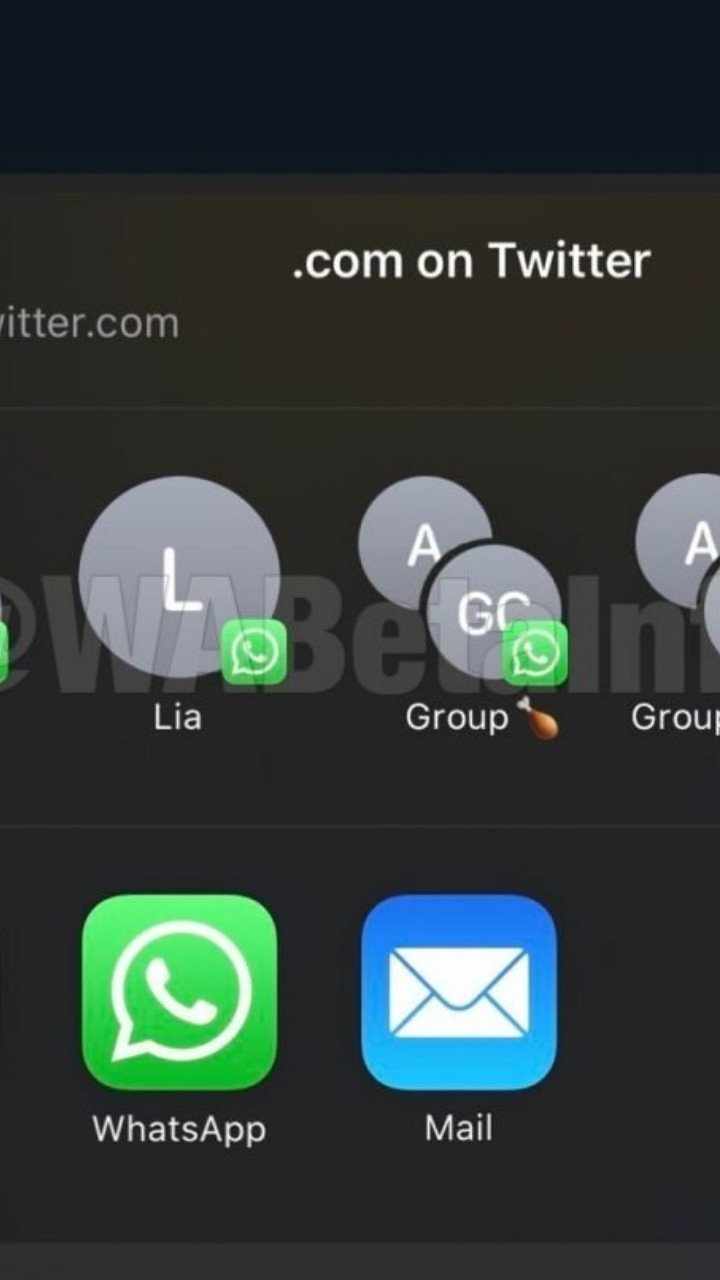
How to manage your contacts on the WhatsApp Share Sheet for iOS WhatsApp offers the support to show your WhatsApp contacts on the iOS share sheet. In this article we explain how to manage these contacts, and how to fix all issues that may occur. WhatsApp allows to show your contacts and groups on the iOS share sheet on iOS 13.6 and newer updates. But is there a way to manage your contacts and groups there? Definitely yes. Add a new contact: You can add a new contact on the share sheet simply sending a message to that specific contact. WhatsApp automatically adds contacts and groups in the share sheet every time there is a new outgoing message in the chat. Note that Screen Lock, in WhatsApp Settings > Account > Screen Lock must be disabled. Remove a contact: If you don’t like to see a specific contact in the share sheet, you have two possibilities, based on which iOS version you’re on: iOS 13: you can remove him blocking and unblocking that contact. WhatsApp automatically removes contacts from the share sheet every time the user is blocked. Note that the contact will be added again every time you chat with him. For groups there isn’t actually a fast way (excluding the possibility to exit from the group). We understand it’s very uncomfortable, but it’s the only way on iOS 13. iOS 14: tap and hold the contact/group on the share sheet and you can remove it. Remove all contacts: You can remove all contacts simply enabling Screen Lock. For privacy reasons, WhatsApp automatically removes all contacts from the share sheet every time you enable Screen Lock. Sometimes the iOS share sheet has issues and WhatsApp contacts doesn’t appear or they do nothing. How to fix? WhatsApp contacts are disappeared: This likely happens after updating your WhatsApp version from the App Store. You have to open WhatsApp and every time you send a new message in a chat, WhatsApp starts to populate the share sheet again. Nothing happens when selecting contacts: The reason is the same above mentioned: just open WhatsApp again after an update and they should start working. If this doesn’t fix the issue, send manually a message to a contact (to update the contact in the share sheet) and try again. If the issue isn’t fixed yet, block and unblock the contact to remove it from the share sheet (because it might be a “bad shortcut”), send a message to that contact and it should work. Some people have also reported that restarting the iPhone definitely helps to fix this bug, because WhatsApp extensions are reloaded. Contacts never appear in the share sheet: As mentioned above, when Screen Lock is enabled, WhatsApp doesn’t add contacts in the share sheet, for privacy reasons. You have to disable Screen Lock if you would like to see them there. Unfortunately you cannot have Screen Lock enabled and contacts in the share sheet at the same time. Posted by Technical MECHZONE